
How to Open an Interactive Brokers (IBKR) Account in Singapore, With Screenshots of Every Step
Want the daily routine? Get the free 15-Minute Swing Trader’s Checklist. Get it free →
By Spencer Li, CFTe · Last updated: 26 October 2026
To open an Interactive Brokers (IBKR) account in Singapore, you start on IBKR’s Singapore application page, create a login and verify your email. Then you work through one long form, covering your account type, trading permissions, personal and employment details, investment experience, tax residence and a signed summary, before you upload your documents and wait for the approval email. As at 26 October 2026, IBKR’s Singapore site lists an account minimum of USD 0.00 and an inactivity fee of USD 0.00 for individual accounts, so opening one costs nothing.
Disclosure: the link above goes to IBKR’s own application page, and Synapse Trading is not paid when you use it.
The screenshots below were taken in November 2022, when this guide first went up. IBKR redesigns its screens every so often, so treat them as a map of the questions you will be asked, rather than a photo of exactly what you will see today.
What should you have ready before you start?
Most people who give up halfway through this form do not give up because it is hard. They give up because step 12 asks for their employer’s details and step 20 asks for a scan of their ID, and neither is on the sofa with them.
So it helps to gather four things first. You want your Singpass login if you are Singaporean or a PR, a clear photo of your NRIC or passport, and your employment details. You also want a rough idea of where your savings came from, because IBKR asks for your source of wealth. Keep something with your address on it within reach too, such as a recent bank statement, in case IBKR asks for it later.
At Synapse Trading we teach on TradingView for the charts and Interactive Brokers for US stocks, which is why this guide exists at all. Half an hour of gathering first saves you a form that sits half-filled for a week.
Steps 1 to 6: how do you create your IBKR login?
The first six steps are the easy ones. They only set up a username and prove that your email address is real.
Step 1 and 2. Click “Open Account” at the top right of the IBKR site, then click “Start Application”.

Step 3. Create your login by filling in the details on screen.

Step 4. IBKR sends a verification email to the address you just used.

Step 5. Open that email and click the link from IBKR.

Step 6. Log in with your new username to begin the actual application.

Steps 7 to 9: which account type and permissions should you pick?
Step 7 looks like the dullest screen in the whole form, and it holds the one choice that is hard to undo.
Step 7. Select your account type and options. The screenshot shows the choices as they looked in 2022.

Step 8. If you are Singaporean, the 2022 form offered a Singpass log-in that filled in most of your personal details for you. Without Singpass, you type them in yourself at steps 10 and 11.

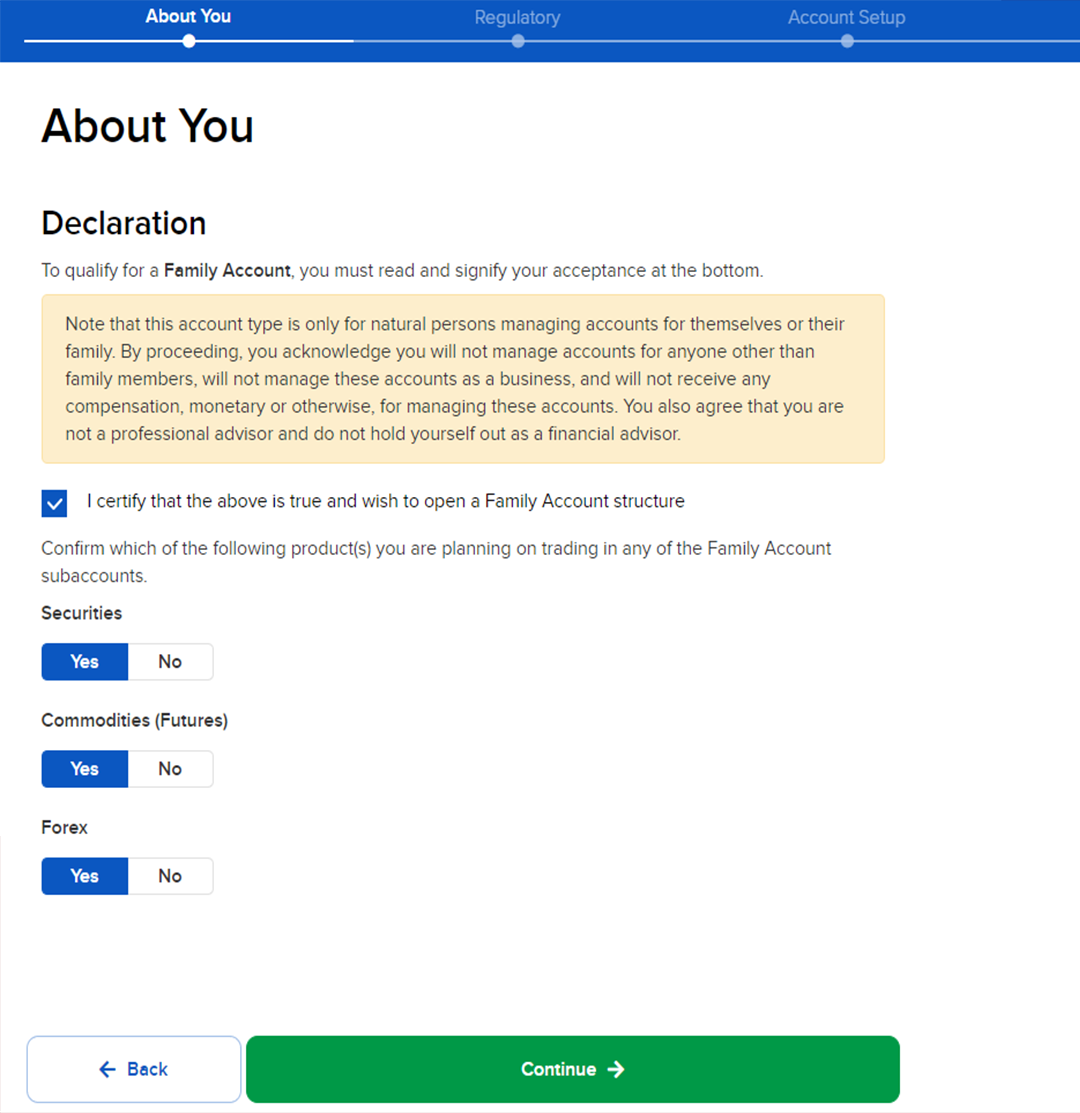
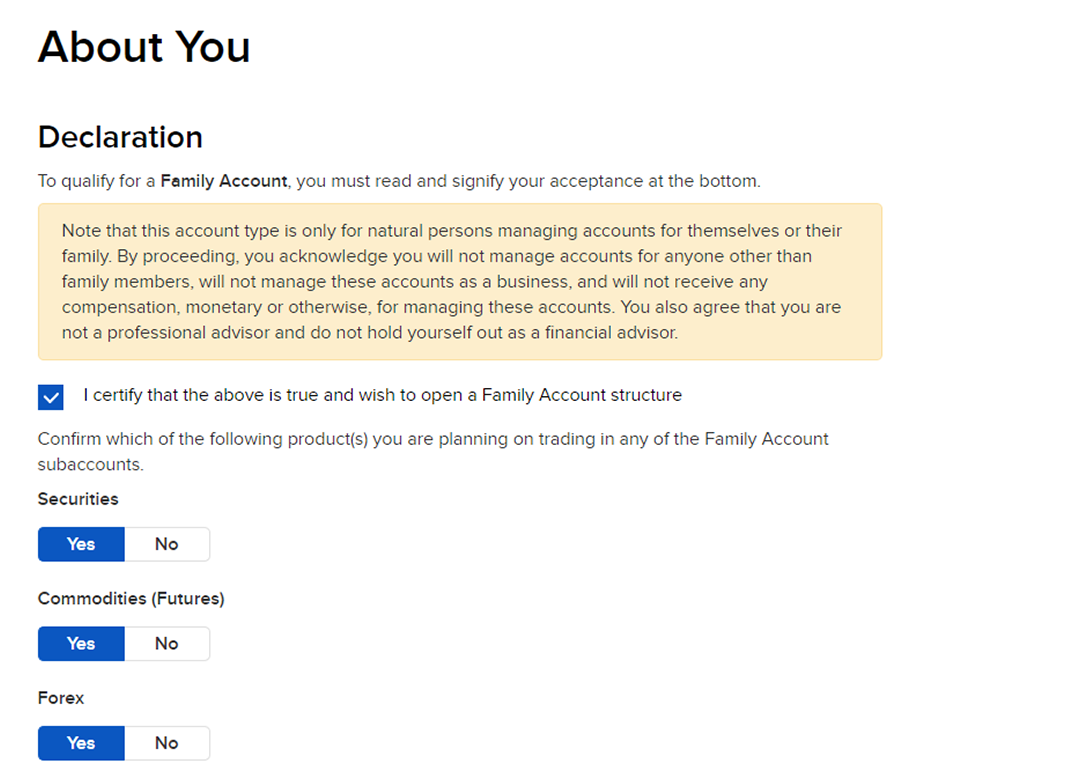
Step 9. Set your trading preferences. If you want to trade stocks and bonds, choose “Securities”.
Why does the cash or margin choice deserve a pause?
In his 2015 letter to shareholders, Jeff Bezos split decisions into two kinds. Most are two-way doors, which you can walk back through if you dislike the room. A few are one-way doors, where “you can’t get back to where you were before”, and he argued those deserve slow, careful thought while the rest should be made quickly.
An account form is mostly two-way doors. You can change your phone number, add a permission later, or fix a typo in your address. But IBKR’s Singapore site states that “Cash accounts may be upgraded to Margin accounts but Margin accounts may not downgraded to Cash accounts.” So a cash account can always become a margin account, and the reverse is never on offer.
A margin account lets you borrow from IBKR against the shares you hold. That is useful, and it is also how a bad week turns into a forced sale. My own trading plan has a written rule for how much spare margin I keep at every close, so that I choose what to sell before the broker does. I wrote that rule down because the alternative is letting fear and a margin call make the decision for me.
So if you are not sure, the cash account is the door you can still walk back through. It is also worth knowing that IBKR’s site says a margin account can change its base currency at any time in Client Portal, so the base currency you pick at step 13 is not as permanent as it looks.
If you would rather spend 15 minutes a day on trading than hours learning broker menus, my free 15-minute swing trader checklist is the daily routine I use myself.
Steps 10 to 16: what goes into the main form?
This stretch is long, and most of it is typing. It asks who you are, what you do, where your money came from and how to verify you later.
Step 10. Fill in your personal information.

Step 11. Continue with the rest of your personal information.
Step 12. Key in your employment details.

Step 13. Complete your “Source of Wealth” and choose a base currency, which is the currency your statements are reported in.

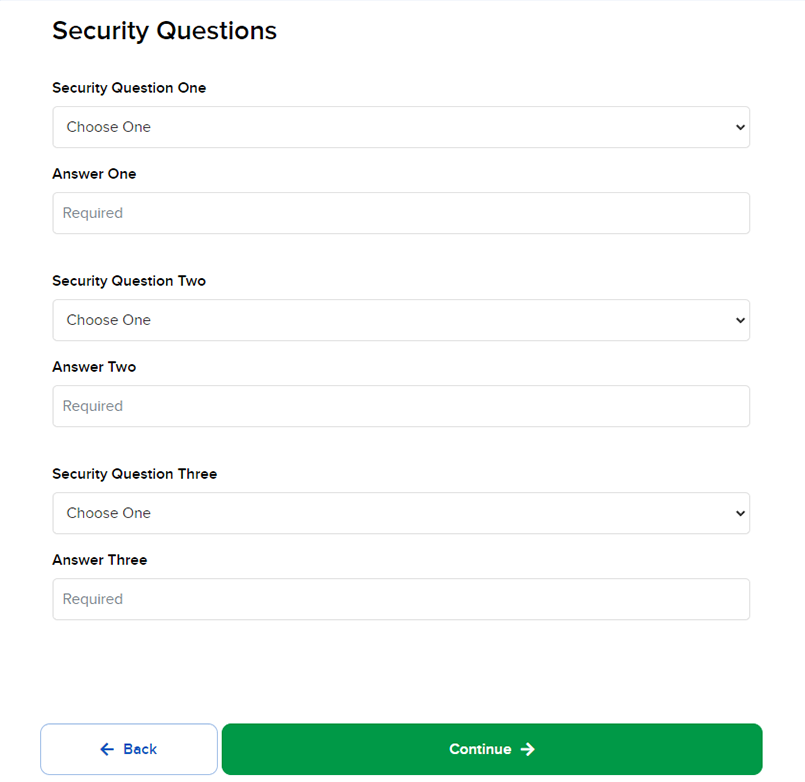
Step 14. Set three security questions. They protect the account if you ever lose your password or need to prove who you are later.
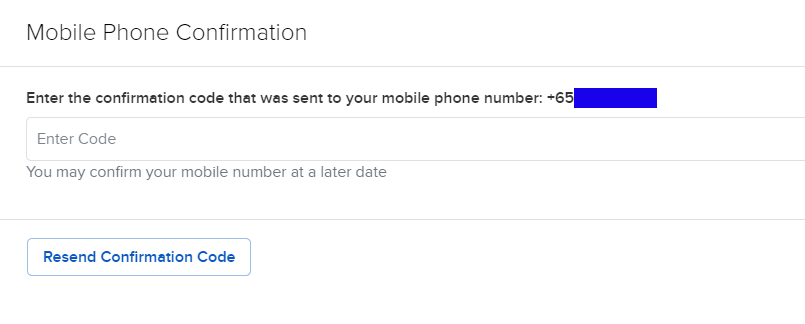
Step 15. Confirm your mobile number. This step is optional.
Step 16. Select the option that applies to you.

Why is step 17 the one to slow down on?
In March 2024, a trader on Reddit’s r/singaporefi described freezing at the experience question. They had tried to answer truthfully, then realised “I wouldn’t be able to open the account since I haven’t done this before.”
It is a fair worry, and it is only partly right. IBKR uses your answers here, together with your age, liquid net worth and investment objectives, to build what it calls your Financial Profile, and it uses that profile to decide which products you may trade. IBKR’s own guide says that “for regulatory reasons, IBKR cannot disclose its eligibility requirements for products”, so nobody outside IBKR can tell you which answer unlocks what.
Step 17. Fill in your investment experience. Some products stay locked if you declare little or no experience.

So the safest answer is the true one. You sign the summary at step 19, and a permission granted on a made-up history is really a permission to lose money on a product you have never traded. You can also ask for more permissions later from your account settings, once you have the screen time to back the claim.
That same trader had also been following an outdated step-by-step guide, and the screens no longer matched. That is the honest limit of any walkthrough, this one included. These screenshots date from November 2022, and if a screen today asks something they do not show, read the question on IBKR’s screen rather than the picture here.
Steps 18 to 22: how do you sign, upload and get approved?
The last five steps are where the application stops being a draft and becomes a signed document.
Step 18. Review your tax-residence information. When it is correct, sign and click “Continue”.

Step 19. Review the summary of everything you entered. When it is final, sign and click “Continue”, and the application goes in for processing.
Step 20. Upload and submit your supporting documents online.
Step 21. Wait for approval. IBKR will ask for any document that is missing or unclear in the meantime.
Step 22. Once approved, you get a confirmation email from IBKR, and the account is ready to fund.

IBKR’s own pages do not promise a fixed approval time. What you can control is the paperwork, because IBKR comes back for any document that is missing or unclear, and each request adds another round of waiting.
While you wait, it is worth deciding how much time trading will get each day. Mine gets 15 minutes, and the free 15-minute swing trader checklist is that routine.
What does the account cost once it is open?
Is there a catch, such as a minimum balance or a fee for leaving the account quiet? On 26 October 2026, IBKR’s Singapore Required Minimums page lists USD 0.00 for both the account minimum and the inactivity fee on individual IBKR Pro and IBKR Lite accounts.
So the account itself costs nothing to hold. You pay when you trade, through commissions, and for any market data you choose to subscribe to. Those prices change often enough that the safest place to read them is IBKR’s own pricing pages on the day you need them.
Once the account is funded, the next question is what to do with it. If you hold idle US dollars, my guide on how to buy US T-bills on Interactive Brokers walks through that. If margin still feels abstract, what a CFD margin call looks like shows the same arithmetic with a worked example.
FAQ
Is it free to open an Interactive Brokers account in Singapore?
Yes. As at 26 October 2026, IBKR’s Singapore site lists an account minimum of USD 0.00 and an inactivity fee of USD 0.00 for individual accounts. You pay commissions when you trade, plus any market data you subscribe to.
How long does IBKR take to approve an account?
IBKR does not publish a fixed time. It emails you when the account is approved and asks for any missing documents before then, so clean, complete uploads are the fastest route.
Should I choose a cash or a margin account?
If you are unsure, start with cash. IBKR states that a cash account can be upgraded to margin later, while a margin account cannot be downgraded to cash.
What should I select for trading permissions?
Choose “Securities” if you want to trade stocks and bonds. You can request more permissions later from your account settings.
Why does the investment-experience question matter?
IBKR uses it, with your age, net worth and objectives, to decide which products you may trade. It does not disclose the exact thresholds, so answer truthfully.
Can I change my base currency later?
IBKR’s Singapore site says a margin account can change its base currency at any time through Client Portal.
Which step held you up the longest, and did any screen ask you something these screenshots do not show? Let me know in the comments, because that is how this guide stays current.
If you are new to all of this, my Beginner’s Guide to Trading and Technical Analysis is a good next read, and my free trading guides collect the rest.
And once the account is open, grab the free 15-minute swing trader checklist, the routine I run every day.
About the author. Spencer Li is The 15-Minute Trader and the founder of Synapse Trading. He is a Certified Financial Technician (CFTe) with 15+ years of trading, run from 70+ countries. He holds a B.Acc and B.BM from SMU. Every trade he takes is public, dated, losses left in. He teaches rules-based swing trading in 15 minutes a day, one system for any market.
Education, not financial advice. Synapse Trading is not licensed by MAS to advise on investment products. Trading carries risk of loss, and past performance is not indicative of future results.
Want the daily routine? Enter your email for the free 15-Minute Swing Trader's Checklist.
Free 5-page PDF, then occasional trading emails. Education only, not financial advice. Unsubscribe anytime. Kit stores your email in the US: see our privacy policy.
Want to learn the full method? The Trading Mastery Program teaches the 4 strategies I have traded since 2011. It suits beginners and experienced traders.
Rather follow the trades as they happen? Daily Trading Signals is our Telegram channel: my trade ideas with entry, stop and exit, and every trade is public.
Questions about this post? Ask in the free Telegram channel →
Educational content only, not personalised financial advice. Trading carries risk, including loss of capital. Past performance is not indicative of future results. Synapse Trading is not licensed or regulated by MAS.

