

How to Deposit and Withdraw Funds in Interactive Brokers (IBKR)
Join our Telegram channel for more market analysis & trading tips: t.me/synapsetrading
Before reading this guide, the first thing you will need to do is to open an Interactive Brokers (IBKR) account, before you can start trading.
Table of Contents
How to Deposit Funds in Interactive Brokers (IBKR)
1. Login to your Interactive Brokers account in your browser. Click on “Deposit”
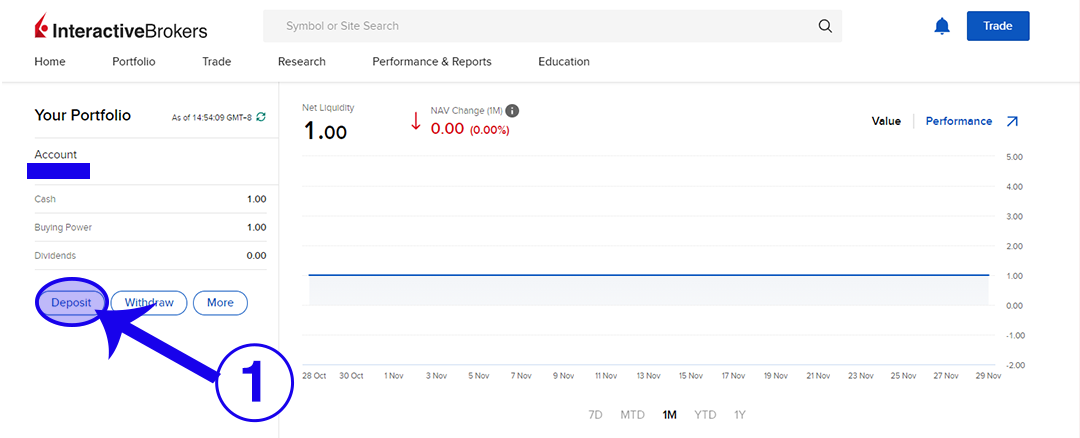
2. Click on “Use a new deposit method”.

3. Select the currency you want to deposit.

4. Click on “Get Instructions”.
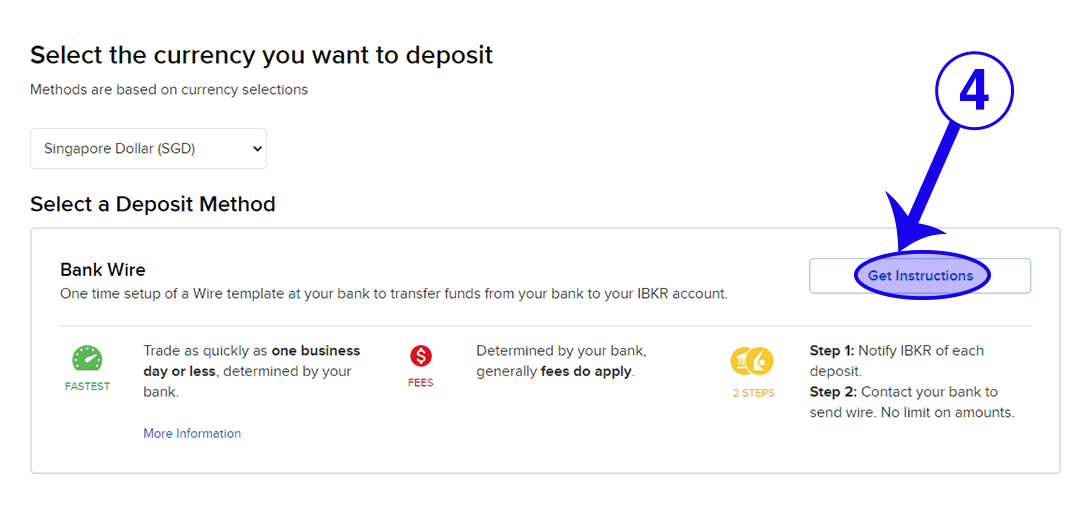
5. Fill in the relevant details. Then click on “Get Wire Instructions”.

6. This is the page where you get the information to transfer the money to. Click on “Finish” when you are ready.

7. Go to your bank and transfer the money to the bank details that you got from Step 6.
8. Check if the money has successfully transferred after a few hours. I highly recommend transferring a very small amount of money on your first time. Then you can transfer again once you are sure that all the details are accurate.
9. Once you have saved your bank information from Step 5, it’s easier to access them again when you click on “Deposit”.
How to Withdraw Funds from Interactive Brokers (IBKR)
One free withdrawal is allowed per calendar month. Subsequent withdrawals using this method will incur a fee of SGD 15.00 at IBKR. Your bank may charge a fee for an incoming wire.
1 Login to your Interactive Brokers account in your browser. Click on “Withdraw”.

2. Select the currency you want to withdraw.

3. Select the method of your choice. For GIRO/ACH (refer to Step 4 to Step 8) and Bank Wire (refer to Step 9 to Step 12).

(Note: If you are doing GIRO or Bank Wire to the same bank account, you NEED to create the method accordingly. This is due to the differences in charges and processing time for either method.)
GIRO/ACH
4. Fill in the relevant details and click “Save Bank Information”.

5. Confirm your bank details again. Complete your Signature and click “Continue”.

6. Your bank information has been saved.

7. Repeat Step 1 to Step 3 again to initiate the GIRO/ACH transfer to the selected account.

8. Key in the withdrawal amount and click on “Create Withdrawal”.

Bank Wire
9. Fill in the relevant details and click “Save Bank Information”.

10. Check your bank details again. Click “Continue”.

11. Your bank details are saved.

12. Repeat Step 1 to Step 3 again to initiate the Bank Wire transfer to the selected account. Key in the withdrawal amount and click on “Create Withdrawal”.

If you found this guide useful, you might also want to check out our full list of guides for Interactive Brokers!
About the author. Spencer Li is the founder of Synapse Trading and a Certified Financial Technician (CFTe) with 15+ years of trading across stocks, forex, crypto, commodities, and bonds. His trade log is public: every trade since April 2024, dated, losses left in. He teaches low-risk swing trading in 15 minutes a day, one system for any market.
Education, not financial advice. Synapse Trading is not licensed by MAS to advise on investment products. Trading carries risk of loss; past performance is not indicative of future results.
 Our flagship mentoring program is suitable for both beginners and advanced traders, covering the 4 strategies which I used over the past 15 years to build up my 7-figure personal trading portfolio.
 If you're looking for the best trading opportunities every day across various markets, and don't want to spend hours doing the research yourself, check out our private Telegram channel!


Leave a Reply
Want to join the discussion?Feel free to contribute!