• Link to Facebook
  • Link to X
  • Link to Instagram
  • Link to Youtube
  • Link to LinkedIn
  • Link to Mail
Synapse Trading
  • Home
  • About
    • My Background
    • My Trading Journey
    • My Travel Log
    • Media & Interviews
  • Mentoring
    • Trading Mastery Program
    • Results & Testimonials
  • Signals
    • Telegram (Free to join!)
    • Daily Trading Signals
    • Daily Trading Signals (Results)
  • Resources
    • Free Trading Guides
    • Tools & Resources
    • Blog & Infographics
  • Contact
    • Contact Us
    • Partnership Opportunities
  • Click to open the search input field Click to open the search input field Search
  • Menu Menu
Spencer Li

Interactive Brokers: One of the Lowest Margin Fees

Promotions, Tools & Resources

Which Broker Has the Lowest Margin Fees? (And How to Actually Minimise Trading Costs)

Last updated: 3 July 2026 · By Spencer Li, CFTe


For most active traders, Interactive Brokers (IBKR) has the lowest margin fees of the major online brokers, a finding that independent reviewer StockBrokers.com has reported in its broker comparisons. Margin fees are the interest your broker charges when you borrow money to trade (trading “on margin”), and they are usually the single most expensive cost a frequent trader ignores. But the cheapest margin rate is not the whole answer. The right broker for you depends on four things together: margin fees, the commission structure (flat fee per trade versus a percentage of trade value), the account minimum to get started, and the range of markets you can actually trade. Pick the broker that wins on the factors you use most, not just the one with the lowest headline number.

Here is how each of those costs works, and how to keep them from quietly eating your returns.

What are margin fees, and why do they matter?

Margin fees are interest. When you trade on margin, you are borrowing money from your broker to take a larger position than your cash alone allows, and the broker charges you interest on that loan for as long as you hold it.

That cost is easy to underestimate because it is not a one-off. A commission is charged once when you enter and once when you exit. Margin interest accrues every day you hold the borrowed position. Hold a leveraged trade for a few weeks, trade frequently, and those daily charges add up far faster than the entry commission you were worried about.

This is why margin fees deserve as much attention as commissions, often more. If you use leverage at all, the broker’s margin rate is a recurring tax on every position you hold.

So which broker has the lowest margin fees?

Interactive Brokers. Independent broker reviewer StockBrokers.com has reported IBKR as having the lowest margin fees among major online brokers, and that has been a consistent advantage of the platform for cost-conscious traders.

Do note that, margin rates move with benchmark interest rates and vary by the size of your balance and your region, so always check the broker’s current published rate before you rely on it. The point is not a fixed number. The point is that if you trade on margin, the gap between the cheapest and most expensive broker compounds on every position you hold.

The four costs to weigh before you open an account

A low margin rate is one factor, not the only one. Here is how the main cost and access factors compare, and who each one matters most to.

FactorWhat it isWatch out forMatters most if you
Margin feesDaily interest on money you borrow to tradeQuoted as an annual rate but charged daily; rises with benchmark ratesUse leverage or hold positions for days or weeks
CommissionsThe charge to place a tradeFlat fee per trade versus a percentage of trade valueTrade often (flat fees win) or trade large sizes (percentages can hurt)
Account minimumThe balance needed to open or keep the accountSome brokers require a minimum; others have noneAre starting out with a smaller account
Investment optionsThe markets you can trade (stocks, bonds, funds, forex, crypto)Some are broad; some specialise in one asset classWant to trade more than one market from one account

Notice the pattern. The “best” broker is the one that is cheapest on the factor you actually use. A flat per-trade commission is a gift if you trade often and a penalty almost never. A percentage-of-value commission can be fine on small trades and painful on large ones. There is no universal winner, only a winner for your style.

Commissions: flat fee or percentage?

Some brokers charge a flat fee per trade. Others charge a percentage of the trade’s value. Which is cheaper depends entirely on how you trade.

If you place many trades, a flat fee per trade is usually the better deal, because the cost does not scale with size. If you place a few large trades, a percentage structure can quietly cost more than you expect. Personally, I would map your own typical trade size and frequency against both structures before you commit, rather than trusting the marketing headline.

Account minimums: lower is better when you are starting

Some brokers require a minimum balance to open an account. Others have no minimum at all. If you are just starting out, a low or no minimum is a real advantage, because it lets you begin small, learn the platform, and scale up as your results justify it, without locking up cash you are not ready to risk.

Investment options: trade more than one market from one place

Some brokers offer a wide range of markets, stocks, bonds, mutual funds, forex, and more. Others specialise in one asset class, such as crypto. If you ever expect to trade more than one market, a broad broker saves you the friction of opening and funding a second account later. One platform, one login, one place your money lives.

Customer service: it only matters when something breaks

Customer service feels minor until the day it isn’t. When an order behaves strangely or you cannot access your account, responsive support, ideally available around the clock, is the difference between a five-minute fix and a stressful afternoon. It is worth a quick check of a broker’s support reputation before you fund the account.

The part the comparison table cannot do for you

A comparison site will tell you which broker has the lowest margin rate in a second. That part is now free. What it will not tell you is whether you should be using margin at all on a given trade, how large to size the position so the leverage does not blow up your account, or when a “cheap” broker is the wrong fit for how you actually trade. The cost table is the easy part. Matching it to your own behaviour, and having the discipline not to let cheap leverage tempt you into oversized positions, is the judgment. That is the human edge no broker comparison can supply for you.

FAQ

Which broker has the lowest margin fees?
Interactive Brokers (IBKR) has been reported by independent reviewer StockBrokers.com as having the lowest margin fees among major online brokers. Margin rates change with benchmark interest rates, so check the broker’s current published rate before relying on it.

What are margin fees?
Margin fees are the interest a broker charges when you borrow money to trade a larger position than your cash allows. The interest accrues daily for as long as you hold the borrowed position.

Are flat-fee or percentage commissions cheaper?
It depends on your trading. A flat fee per trade is usually cheaper if you trade frequently, because the cost does not scale with trade size. A percentage of trade value can cost more on large trades. Match both structures against your own typical trade size and frequency.

Do I need a minimum balance to start trading?
Some brokers require a minimum balance to open an account; others have no minimum. If you are starting out, a low or no minimum lets you begin small and scale up as your results justify it.

Besides fees, what should I look for in an online broker?
Beyond margin fees and commissions, weigh the account minimum, the range of markets you can trade (stocks, bonds, funds, forex, crypto), and the quality and availability of customer support.


Once you have a low-cost broker set up, the next question is what to do with it. If you want the full beginner path, start with the pillar guide: How to Start Trading: A Beginner’s Guide.

Want a simple system to use that account with? Grab the free 15-Minute Swing Trading Starter Kit. It’s the exact routine I use to scan once a day and trade any market in 15 minutes.


About the author. Spencer Li is the founder of Synapse Trading and a Certified Financial Technician (CFTe) with 15 years of trading across stocks, forex, crypto, commodities, and bonds. His trade log is public, 404 trades, losses left in. He teaches low-risk swing trading in 15 minutes a day, one system for any market.

Education, not financial advice. Synapse Trading is not licensed by MAS to advise on investment products. Trading carries risk of loss; past performance is not indicative of future results.


Related

How to Start Trading: A Beginner’s Guide (pillar) · How to Open an Interactive Brokers Account · Best Online Brokers Compared · What Is Margin Trading?
0 Comments/by Spencer Li
https://synapsetrading.com/wp-content/uploads/2019/10/logo.jpg 0 0 Spencer Li https://synapsetrading.com/wp-content/uploads/2019/10/logo.jpg Spencer Li2023-05-06 21:57:202026-07-06 02:43:32Interactive Brokers: One of the Lowest Margin Fees
Spencer Li

Interactive Brokers: Earn Up to 4.33% on Your Uninvested Cash Holdings

Promotions, Tools & Resources

Does Interactive Brokers Pay Interest on Cash? (IBKR Cash Interest Explained)

Last updated: 14 June 2026 · By Spencer Li, CFTe


Yes, Interactive Brokers (IBKR) pays interest on the spare cash sitting in your account, but only on cash that has settled and stayed put for a while, and only above a minimum balance. Accounts holding more than USD 100,000 in long-settled cash earn the full posted interest rate, and smaller accounts earn a rate proportional to their size, so the more idle cash you hold, the closer you get to the full rate. Interest accrues daily and IBKR pays it once a month, on the third business day of the following month. It is automatic. You do not subscribe, click anything, or move your cash into a separate product to receive it. The one thing worth knowing up front: a few currencies are treated differently, and cash held in JPY or RUB can actually earn a negative rate, while some other currencies earn 0%.

So your money does not sit idle between trades. Here is exactly how the interest works, who qualifies for the full rate, and the currency traps to watch.

How does IBKR cash interest work?

IBKR pays interest on “long-settled” cash, which means cash that has cleared and been sitting in your account, not money you deposited yesterday or freed up from a trade that has not settled yet. The idea is simple. While your cash waits between trades, IBKR pays you a yield on it rather than letting it earn nothing.

Two numbers shape what you actually receive:

  • Your balance. Above USD 100,000 of long-settled cash, you earn the full posted rate. Below that, you earn a rate proportional to your balance, so a smaller account earns a smaller slice of the full rate.
  • The posted rate itself. This is set by IBKR and moves with the market, so the headline figure today will not be the figure next year. Always check the live rate on IBKR’s own site rather than any number you read in a blog post, including this one.

Interest accrues daily and is posted monthly, on the third business day of the following month. So the interest you earn across, say, June shows up in your account in early July.

Who qualifies for the full interest rate?

Anyone can earn interest, but the full posted rate kicks in at USD 100,000 of long-settled cash (or the equivalent in another currency). Below that line, you still earn, just at a proportional rate.

Here is the tiered picture in one view.

Long-settled cash balanceWhat you earnNotes
Above USD 100,000Full posted interest rateThe rate IBKR publishes, set by the market
Below USD 100,000A rate proportional to your balanceSmaller balance, smaller slice of the full rate
Held in JPY or RUBCan be a negative rateYou may pay rather than earn on these
Certain other currencies0%No interest credited

Do note that these are policy thresholds IBKR sets, and a broker can change its own policy. Treat the structure as the durable part and the exact rate as the moving part.

What is the auto-swap program?

There is a second, more advanced layer for larger accounts. If you hold both large long and large short cash positions across different currencies, IBKR offers an auto-swap program. You authorize IBKR to execute the forex transactions that net those positions against each other, which improves your overall interest benefit and lowers your interest cost.

This one is not for most retail traders. The auto-swap program is only open to qualifying investors with cash balances of at least USD 10 million or equivalent, or to those who qualify as an Eligible Contract Participant (ECP, a US regulatory category for large or sophisticated market participants). If you are reading this to figure out the interest on a few thousand dollars of idle cash, this layer simply does not apply to you, and that is fine.

The currency trap to watch

Most people assume “interest on cash” can only ever be a good thing. Not always. Cash held in JPY or RUB may receive a negative rate, which means you can be charged rather than paid for holding it. Other currencies may earn 0%.

This matters more than it sounds. If you trade globally through IBKR, your cash can end up parked in a currency you did not consciously choose, simply as the by-product of your last few trades. Personally, I keep an eye on which currency my idle cash is actually sitting in, because the interest treatment follows the currency, not your intentions.

Cash interest vs parking cash in T-Bills

Earning interest on idle cash is the passive, do-nothing option. The active alternative, if you want your spare cash working harder, is to park it in short-dated US Treasury Bills (T-Bills) inside the same IBKR account. T-Bills behave almost like cash because they are so short-dated, but they let you lock in a known yield to maturity rather than a floating cash rate. I walk through the exact steps in how to buy US T-Bills on Interactive Brokers.

Which one is “better” is not really the question. The cash rate is effortless and floating. The T-Bill is a small, deliberate action that fixes your yield. A scanner can tell you both rates in a second. It will not tell you whether your trading plan needs that cash liquid next week, which is the judgment call that decides between them. That judgment, deciding when idle cash should stay liquid and when it should be put to work, is the part no tool trades for you.

Tips from the trading desk

  • The interest is automatic. You do not need to enrol, so there is nothing to set up beyond holding cash in the account.
  • Watch the currency your idle cash sits in, not just the amount. JPY and RUB can turn the interest negative.
  • Remember the settlement delay. Only long-settled cash earns, so freshly deposited or just-freed cash does not start earning immediately.
  • The rate moves. Check IBKR’s live figure rather than trusting any quoted number, including the ones above.

FAQ

Does Interactive Brokers pay interest on uninvested cash?
Yes. IBKR pays interest on long-settled cash (cash that has cleared and been sitting in the account). Balances above USD 100,000 earn the full posted rate, and smaller balances earn a rate proportional to their size.

How much do you need in IBKR to earn the full interest rate?
You need more than USD 100,000 of long-settled cash, or the equivalent in another currency, to earn the full posted rate. Below that threshold you still earn interest, just at a proportional rate.

When does IBKR pay the cash interest?
Interest accrues daily and is paid out monthly, on the third business day of the following month. So a month’s interest appears in your account early in the next month.

Can IBKR cash interest be negative?
Yes, for some currencies. Cash held in JPY or RUB may receive a negative rate, meaning you are charged rather than paid, and some other currencies earn 0%.

What is the IBKR auto-swap program?
It is an advanced program for large accounts. You authorize IBKR to execute forex transactions that net your long and short cash positions to improve your overall interest, but it is only available to qualifying investors with at least USD 10 million in cash, or those who qualify as an Eligible Contract Participant (ECP).


That is the whole picture on IBKR cash interest. If you have not opened the account yet, start with the pillar: Interactive Brokers (IBKR) for Beginners: A Complete Guide.

Want a trading routine that fits around a day job? Grab the free 15-Minute Swing Trading Starter Kit. It is the exact once-a-day process I use to scan and trade any market in 15 minutes.


About the author. Spencer Li is the founder of Synapse Trading and a Certified Financial Technician (CFTe) with 15 years of trading across stocks, forex, crypto, commodities, and bonds. His trade log is public, 404 trades, losses left in. He teaches low-risk swing trading in 15 minutes a day, one system for any market.

Education, not financial advice. Synapse Trading is not licensed by MAS to advise on investment products. Trading carries risk of loss; past performance is not indicative of future results.


Related

Interactive Brokers for Beginners (pillar) · How to buy US T-Bills on IBKR · Deposit and withdraw on Interactive Brokers · Open and set up an Interactive Brokers account

0 Comments/by Spencer Li
https://synapsetrading.com/wp-content/uploads/2019/10/logo.jpg 0 0 Spencer Li https://synapsetrading.com/wp-content/uploads/2019/10/logo.jpg Spencer Li2023-05-06 21:54:442026-07-06 01:59:36Interactive Brokers: Earn Up to 4.33% on Your Uninvested Cash Holdings
Spencer Li

A Day in the Life of a Trader

Promotions, Trading Tips
Thumbnail A day in the life of a trader

Are you curious about what it’s like to be a trader? I know I was when I first started out. The fast-paced, ever-changing markets were daunting, but also incredibly exciting. 

As a trader, I rely on a wide range of tools and technologies to stay informed and make informed trading decisions. From trading platforms to charting software and high-speed data feeds, each tool plays a critical role in helping me navigate the markets.

And when it comes to strategies and techniques, there are so many different approaches to choose from. Whether it’s technical analysis, fundamental analysis, or news trading, every trader has their own style and preference. It’s all about finding what works for you and sticking to it.

In this video collaboration with XM Global brokerage, I’ll take you through a day in the life of a trader, from pre-market preparation to end-of-day analysis, and share some useful tools to help in your trading journey.


What is the day-to-day schedule of a trader like?

The day-to-day schedule of a trader can vary depending on the type of trading they do and the market they specialize in. 

However, some general activities that traders typically engage in include:

  • Pre-market preparation: Traders usually start their day by reviewing news and market data that may impact their trades. They also analyze their trading strategies and review their portfolio positions.
  • Market open: The first few hours after the market opens are typically the busiest for traders. They execute trades based on their analysis and strategy.
  • Monitoring: Throughout the day, traders monitor the markets and track the progress of their trades. They may adjust their positions or exit trades as needed.
  • Research: Traders spend time researching and analyzing market trends and news, as well as studying the performance of different companies and sectors.
  • Networking: Traders often build relationships with other traders and brokers to gain insights and market information that can help inform their trades.
  • End of day analysis: At the end of the day, traders review their performance and analyze their trades to identify areas for improvement.

Overall, the schedule of a trader is fast-paced and can be demanding, requiring a high level of focus, discipline, and adaptability.

What tools and technologies do traders use?

Traders use a wide range of tools and technologies to help them analyze markets, identify trends, and execute trades. 

Some of the most common tools and technologies used by traders include:

  • Trading platforms: These are software applications that allow traders to access financial markets, view real-time prices and charts, and place trades.
  • Charting software: Traders use charting software to create visual representations of price movements and identify patterns in the market.
  • News feeds: Traders rely on news feeds to stay up-to-date with the latest developments in the markets, including economic data releases, corporate announcements, and geopolitical events.
  • Algorithmic trading systems: These are computer programs that execute trades automatically based on pre-set rules and parameters.
  • Risk management software: Traders use risk management software to monitor and control their exposure to market risks, including volatility, liquidity, and counterparty risk.
  • Electronic trading networks: These are online platforms that connect traders with each other and with liquidity providers, allowing them to trade directly with one another without the need for a broker.
  • Mobile trading apps: Traders use mobile trading apps to access the markets and manage their trades from their mobile devices.
  • High-speed data feeds: Traders require real-time market data to make informed trading decisions. High-speed data feeds provide up-to-the-millisecond pricing information that traders use to execute trades.

What are some strategies and techniques used by traders?

There are various strategies and techniques used by traders, and different traders may prefer different methods depending on their personal preferences and risk tolerance. 

Here are some common strategies and techniques:

  • Technical analysis: This involves studying price charts and using technical indicators to identify trends, patterns, and potential trading opportunities.
  • Fundamental analysis: This involves analyzing economic and financial data, such as company earnings reports, economic indicators, and news events, to make trading decisions.
  • Trend following: This involves identifying the direction of a trend and entering trades in the same direction, hoping to ride the trend for profit.
  • Scalping: This involves making numerous trades over a short time frame to take advantage of small price movements.
  • Swing trading: This involves holding positions for a few days or weeks, aiming to capture price movements within a longer-term trend.
  • Position trading: This involves holding positions for several months to a year or more, taking a long-term view on the markets.
  • News trading: This involves taking advantage of market volatility caused by news events, such as interest rate changes, economic data releases, and geopolitical events.
  • Arbitrage: This involves taking advantage of price differences between different markets or assets to make a profit.

Traders may also use various risk management techniques, such as setting stop-loss orders to limit losses, using leverage to amplify gains, and diversifying their portfolio to reduce risk.

My trading journey and challenges

My trading journey has been a rollercoaster ride, filled with ups and downs. When I first started trading, I was filled with excitement and optimism. I was eager to learn and I spent countless hours reading books, attending seminars, and watching educational videos. However, as I started trading with real money, I quickly realized that things were not as easy as they seemed.

One of the biggest challenges I faced was my emotions. I found it difficult to stay disciplined and stick to my trading plan. I would often get too caught up in the moment and make impulsive decisions, which led to losses. It took a lot of self-reflection and practice to develop the mental fortitude required to be a successful trader.

Another challenge I faced was finding a reliable trading strategy that worked for me. I tried out several different approaches, from day trading to swing trading, but I struggled to find a consistent method that produced the results I was looking for. It wasn’t until I discovered price action trading that I finally found a strategy that resonated with me.

Despite the challenges, I persisted in my trading journey, and over time I learned to manage my emotions and stick to my trading plan. I also became more confident in my trading abilities as I saw my profits grow. Looking back on my journey, I am proud of the progress I have made and the lessons I have learned. Trading is not easy, but with the right mindset and approach, it is possible to succeed.

Looking for a professional trading platform to give you an edge? 

XM Global is a leading brokerage company that is dedicated to providing traders with a seamless and efficient trading experience, providing access to more than 50 currency pairs. As a trusted platform for many traders, XM is committed to helping traders improve their skills and succeed in the trading world.

To further assist traders in their trading journey, XM provides ongoing EN Live Education sessions with experts and global instructors around the world. They have 2 rooms, one for beginners and one for advanced traders, and both rooms are live everyday from 3PM – 12 AM SGT to cover a wide variety of topics to help traders improve their trading. These live education sessions are also a great opportunity for traders to learn valuable insights and strategies that can help them achieve their trading goals.

For traders looking for a reliable and trusted trading platform, XM is the ideal choice. Sign up now using the link below to join their EN Live Education and learn from some of the well-known experts in the industry.

Schedule: Monday – Friday (3PM – 12AM SGT)

Refer here for more information: https://www.xm.com/english-education-schedule 

Concluding Thoughts

In summary, trading is not without its challenges. It can be difficult to stay disciplined and stick to your trading plan when the markets are constantly in flux. And finding a reliable trading strategy that works for you is easier said than done.

But despite the challenges, being a trader is incredibly rewarding. I’ve learned so much over the years and have seen my profits grow as I become more confident in my trading abilities. 

Now that I have shared all about the daily life of a  trader, is this something that you would consider doing full time?

Also, for those who are actively trading, what are some challenges you face in your trading?

Let me know in the comments below.

If you are keen on any partnerships or sponsored content, check out:
🤝 https://synapsetrading.com/?p=28772

0 Comments/by Spencer Li
https://synapsetrading.com/wp-content/uploads/2023/04/Thumbnail-A-day-in-the-life-of-a-trader.png 720 1280 Spencer Li https://synapsetrading.com/wp-content/uploads/2019/10/logo.jpg Spencer Li2023-04-05 03:36:592024-08-03 19:55:26A Day in the Life of a Trader
Spencer Li

How Place Trades (Buy & Sell) on Interactive Brokers (IBKR)

Promotions, Tools & Resources

How to Place a Trade on Interactive Brokers (IBKR): Buy and Sell Orders Explained

Last updated: 3 July 2026 · By Spencer Li, CFTe


To place a trade on Interactive Brokers, open the Order Ticket, search the product you want, click Buy or Sell, set your quantity and order type, then click Submit Order. That is the whole flow. Inside the IBKR Client Portal (the web platform) or Trader Workstation (the desktop app), the path is: Trade, then Order Ticket, then search the symbol, then choose Buy or Sell, set quantity, pick your order type (Market, Limit, Stop, and so on), and submit. A market order fills immediately at the current price; a limit order only fills at your price or better. The two settings beginners skip are time-in-force (how long the order stays live) and attached orders (an automatic profit target and stop loss bracketed around your entry). Get those two right and your trade manages itself even when you are not watching.

Here is the click-by-click flow, then every order type explained in plain English, so you know which one to use and when.

How do I place a buy or sell order on Interactive Brokers?

The buy and sell flow is the same. Here it is, start to finish.

  1. Click Trade.
  2. Click Order Ticket.
  3. Choose which product you want to trade.
  4. Type the company or symbol you want. For example, say I want to buy 2 shares of Coca-Cola. I key in the company name and press enter.
  5. Select the correct product from the results.
  6. The page updates for that product. Click Buy (or Sell).
  7. Adjust the quantity. In this example I set it to 2.
  8. Click Submit Order. That is it, the 2 shares are bought.

[screenshot: IBKR Order Ticket with Coca-Cola selected, Buy side, quantity 2, before submission]

Before you can do any of this, you need a funded IBKR account. If you have not opened one yet, do that first, then come back to this guide.

Steps 7 and 8 hide the two settings that actually matter: the order type, the time-in-force, and any attached orders. The next sections cover all three.

What are the order types on Interactive Brokers?

An order type tells IBKR how to fill your trade. The two you will use most are Market and Limit. The rest are variations that give you more control over price or timing. Here they are side by side.

Order typeWhat it doesUse it when
MarketBuys or sells at the current bid or ask. Fast and likely to fill, but no price protection, it can fill far from the price you saw.You want in or out now and the exact price matters less than the fill.
LimitBuys or sells at a specified price or better. Will not fill worse than your limit, but is not guaranteed to fill at all.You have a price in mind and you would rather miss the trade than overpay.
MidPriceSplits the bid-ask spread and fills at the midpoint of the NBBO (National Best Bid and Offer) or better. You can set a price cap.You want a better price than market without naming an exact limit.
StopSends a market order once your stop trigger price is hit. No guaranteed execution price, it can fill well away from the stop.Protecting a position. A sell stop sits below price to cap a loss; a buy stop sits above.
Stop LimitSends a limit order once the stop trigger is hit. Removes the slippage risk of a plain stop, but the limit may never fill, you can “miss the market”.You want stop protection but refuse to fill below a set price.
Market on Close (MOC)A market order set to execute as close to the closing price as possible.You want the closing print, not an intraday price.
Limit on Close (LOC)Submitted at the close; fills only if the closing price is at or better than your limit.You want the close, but only at your price or better.

A stop order, to be precise, is an instruction to submit a buy or sell market order if and when your specified trigger price is reached or penetrated. A sell stop is always placed below the current market price and is typically used to limit a loss or protect a profit on a long position. A buy stop is always placed above the current price and does the same job on a short.

A stop-limit has two prices: the stop (the trigger) and the limit (the worst price you will accept). When a trade occurs at or through the stop price, the order becomes executable and enters the market as a limit order. It eliminates the slippage risk of a plain stop, but it exposes you to the risk that the order never fills even if the stop is reached. That is the trade-off: price certainty in exchange for fill uncertainty.

Personally, for swing trading I keep it simple. I use limit orders to enter, and stop orders to protect. I rarely need the exotic ones. The point of knowing all of them is so you can tell when a situation actually calls for one, not so you feel obliged to use them.

What does time-in-force mean on IBKR?

Time-in-force defines how long your order keeps working before it is cancelled. If your order does not fill, this setting decides whether it dies today or waits for you.

  • Day: Cancelled if it does not execute by the close of the trading day. Unless you specify otherwise, every order is a Day order by default. Worth remembering, a limit you set in the morning is gone by tonight unless you change this.
  • Good Till Cancel (GTC): Keeps working until it fills or you cancel it. This lets you place a resting bid well below the current price (or an offer well above) and leave it for days, weeks, or months without re-entering it each day.
  • At the Opening: Sends a market-on-open (MOO) or limit-on-open (LOO) order, set to execute at the market open.

For swing trading, GTC is the quiet workhorse. Set your entry below price, walk away, and let the market come to you instead of staring at the screen.

What are attached orders (Profit Taker and Stop Loss)?

Attached orders are the bracket around your entry: the moment you are filled, IBKR places an automatic exit on each side. This is how you make a trade manage itself.

  • Profit Taker: An opposite-side limit order that closes the position while it is profitable. Example: you buy a stock at $10. You set your profit-taker limit price at $11 to lock in $1 per share.
  • Stop Loss: An opposite-side stop order that closes the position at a user-specified, limited loss. Example: you buy a stock at $10. You set your stop-loss stop price at $9 to cut the loss if the stock plummets.

[screenshot: IBKR attach-orders panel showing a Profit Taker limit above entry and a Stop Loss stop below entry]

Do note that, attaching both at once turns your trade into a bracket order. You define your exit before the trade goes against you, while you are calm, instead of inventing one mid-panic. That is the entire reason I teach attached orders early. The order ticket is not just for getting in; it is where you pre-commit to getting out.

Where the human edge comes in

IBKR will execute any of these orders for you in milliseconds, and an AI can name every order type faster than you can read this. What neither will do is decide which order this particular trade needs, where the stop actually belongs, or how many shares to buy so the loss is one you can live with. The platform is the easy part. Knowing your exit before your entry, and sizing so a wrong call costs you a flesh wound and not a limb, is discipline and sizing. That is the second of the Five Edges, and it is the one the order ticket quietly rewards.

FAQ

How do I place a trade on Interactive Brokers?
Click Trade, then Order Ticket, search the product you want, click Buy or Sell, set the quantity and order type, then click Submit Order. You need a funded IBKR account first.

What is the difference between a market order and a limit order on IBKR?
A market order fills immediately at the current bid or ask with no price protection. A limit order fills only at your specified price or better, but is not guaranteed to fill at all. Use market when speed matters most, limit when price matters most.

What is the default time-in-force on Interactive Brokers?
Day. Unless you specify otherwise, every order is a Day order and is cancelled if it does not fill by the close. Choose Good Till Cancel (GTC) if you want the order to keep working across multiple days.

What is the difference between a stop order and a stop-limit order?
A stop order becomes a market order when the trigger is hit, so it is likely to fill but can fill away from your stop price. A stop-limit becomes a limit order, so it protects your price but may never fill if the market gaps past it.

How do I set a profit target and stop loss on IBKR?
Use attached orders on the order ticket. A Profit Taker is an opposite-side limit order above your entry; a Stop Loss is an opposite-side stop order below it. Attaching both creates a bracket that closes the position automatically at whichever level is hit first.


Now that you can place an order and bracket it, the next question is which trade to place. That is where a repeatable setup beats a fast platform.

For the full set of IBKR walkthroughs, read the pillar: The Complete Guide to Interactive Brokers (IBKR).

Want a system to point the order ticket at? Grab the free 15-Minute Swing Trading Starter Kit. It is the exact routine I use to scan once a day and trade any market in 15 minutes, entry, stop, and target included.


About the author. Spencer Li is the founder of Synapse Trading and a Certified Financial Technician (CFTe) with 15 years of trading across stocks, forex, crypto, commodities, and bonds. His trade log is public, 404 trades, losses left in. He teaches low-risk swing trading in 15 minutes a day, one system for any market.

Education, not financial advice. Synapse Trading is not licensed by MAS to advise on investment products. Trading carries risk of loss; past performance is not indicative of future results.


Related

Complete Guide to Interactive Brokers (pillar) · How to open an Interactive Brokers account · Market vs limit orders explained · How to set a stop loss

0 Comments/by Spencer Li
https://synapsetrading.com/wp-content/uploads/2019/10/logo.jpg 0 0 Spencer Li https://synapsetrading.com/wp-content/uploads/2019/10/logo.jpg Spencer Li2022-11-29 21:36:002026-07-06 02:47:51How Place Trades (Buy & Sell) on Interactive Brokers (IBKR)
Spencer Li

How to Deposit and Withdraw Funds in Interactive Brokers (IBKR)

Promotions, Tools & Resources

Before reading this guide, the first thing you will need to do is to open an Interactive Brokers (IBKR) account, before you can start trading.


How to Deposit Funds in Interactive Brokers (IBKR)

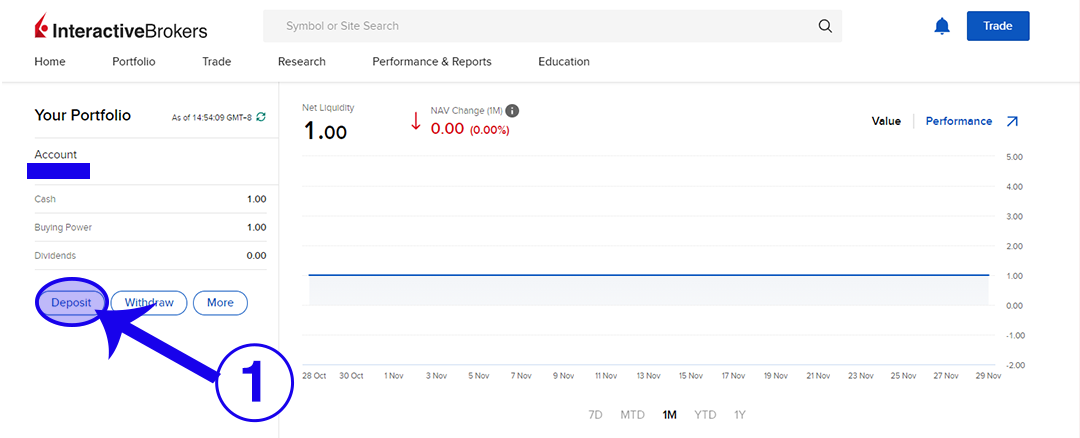
1. Login to your Interactive Brokers account in your browser. Click on “Deposit”

Step 1 How to Deposit into IBKR fund account

2. Click on “Use a new deposit method”.

Step 2 How to Deposit into IBKR fund account

3. Select the currency you want to deposit.

Step 3 How to Deposit into IBKR fund account

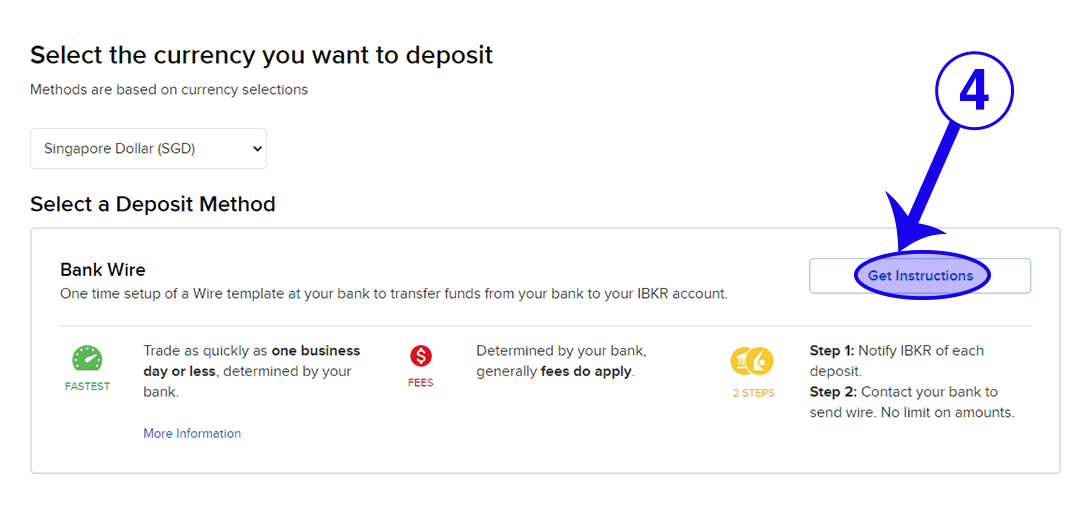
4. Click on “Get Instructions”.

Step 4 How to Deposit into IBKR fund account

5. Fill in the relevant details. Then click on “Get Wire Instructions”.

Step 5 How to Deposit into IBKR fund account

6. This is the page where you get the information to transfer the money to. Click on “Finish” when you are ready.

Step 6 How to Deposit into IBKR fund account

7. Go to your bank and transfer the money to the bank details that you got from Step 6.

8. Check if the money has successfully transferred after a few hours. I highly recommend transferring a very small amount of money on your first time. Then you can transfer again once you are sure that all the details are accurate.

9. Once you have saved your bank information from Step 5, it’s easier to access them again when you click on “Deposit”.


How to Withdraw Funds from Interactive Brokers (IBKR)

One free withdrawal is allowed per calendar month. Subsequent withdrawals using this method will incur a fee of SGD 15.00 at IBKR. Your bank may charge a fee for an incoming wire.

1 Login to your Interactive Brokers account in your browser. Click on “Withdraw”.

Step 1 How to Withdraw from IBKR fund account

2. Select the currency you want to withdraw.

Step 2 How to Withdraw from IBKR fund account

3. Select the method of your choice. For GIRO/ACH (refer to Step 4 to Step 8) and Bank Wire (refer to Step 9 to Step 12).

Step 3 How to Withdraw from IBKR fund account

(Note: If you are doing GIRO or Bank Wire to the same bank account, you NEED to create the method accordingly. This is due to the differences in charges and processing time for either method.)


GIRO/ACH

4. Fill in the relevant details and click “Save Bank Information”.

Step 4 How to Withdraw from IBKR fund account

5. Confirm your bank details again. Complete your Signature and click “Continue”.

Step 5 How to Withdraw from IBKR fund account

6. Your bank information has been saved.

Step 6 How to Withdraw from IBKR fund account

7. Repeat Step 1 to Step 3 again to initiate the GIRO/ACH transfer to the selected account.

Step 7 How to Withdraw from IBKR fund account

8. Key in the withdrawal amount and click on “Create Withdrawal”.

Step 8 How to Withdraw from IBKR fund account


Bank Wire

9. Fill in the relevant details and click “Save Bank Information”.

Step 9 How to Withdraw from IBKR fund account


10. Check your bank details again. Click “Continue”.

Step 10 How to Withdraw from IBKR fund account

11. Your bank details are saved.

Step 11 How to Withdraw from IBKR fund account

12. Repeat Step 1 to Step 3 again to initiate the Bank Wire transfer to the selected account. Key in the withdrawal amount and click on “Create Withdrawal”.

Step 12 How to Withdraw from IBKR fund account


If you found this guide useful, you might also want to check out our full list of guides for Interactive Brokers!

0 Comments/by Spencer Li
https://synapsetrading.com/wp-content/uploads/2019/10/logo.jpg 0 0 Spencer Li https://synapsetrading.com/wp-content/uploads/2019/10/logo.jpg Spencer Li2022-11-29 21:12:132023-05-03 23:35:21How to Deposit and Withdraw Funds in Interactive Brokers (IBKR)
Page 1 of 212

Free Trading Guides

Free Trading Guides

Blog Categories

  • Beginner's Guide
  • Blockchain & Crypto
  • Book Summaries
  • Candlestick Patterns
  • Economics & News Trading
  • Investing & Portfolio Management
  • Living Your Best Life
  • Market Analysis
  • News & Events
  • Price Chart Patterns
  • Promotions
  • Risk & Money Management
  • Stock Trading
  • Testimonials
  • Tools & Resources
  • Trading Psychology
  • Trading Strategies
  • Trading Tips
  • Travel & Lifestyle

Free Trading Guides

Free Trading Guides

Contact Us

Synapse Trading Pte Ltd
Registration No. 201316168H

Whatsapp: +65-8897-1204
Telegram: @iamrecneps
Email: info@synapsetrading.com

Links

Disclaimer
Privacy policy
Terms & Conditions
Contact us
Partnerships

© 2012-2024 Synapse Trading | All rights reserved | - powered by Enfold WordPress Theme
  • Link to Facebook
  • Link to X
  • Link to Instagram
  • Link to Youtube
  • Link to LinkedIn
  • Link to Mail
Scroll to top Scroll to top Scroll to top